
This is our complete, data-backed review of Nitroflare Premium — every test we ran, every number we recorded, and our honest take on whether it’s worth paying for. Looking for setup steps instead? → Quick Start Guide. Want a fast comparison table? → Free vs Premium.
Updated July 2026
Rating: ⭐⭐⭐⭐ (4/5)
Verdict: Premium delivers real, measurable gains for anyone downloading large files or multi-part archives regularly. It’s unnecessary if you only need one small file occasionally.
| ✅ What We Liked | ⚠️ What to Consider |
|---|---|
| 12.4 MB/s in single-file Chrome test | Traffic is capped, not unlimited |
| Strong scaling with multiple files | Speed varies by server/location |
| Instant JDownloader recognition | Wasteful for very light use |
| Live traffic balance display | Billing issues need official support |
| Zero countdown delay | VPN routing can still slow things down |
Testing Methodology
We used a paid Nitroflare account on a stable home connection and ran three separate tests: one file in Chrome, four files in Chrome, and four active tasks in JDownloader 2. Each file was large enough for speed to stabilize before we captured results — a very small file can finish before a browser ever reaches a steady rate.
These are real results from one connection on one day. They are not a guarantee for your setup.
Test 1: Chrome, Single File — 12.4 MB/s
Our first test used a 1.1 GB RAR file. Chrome’s native download manager showed a steady 12.4 MB/s, with 397 MB downloaded and about one minute remaining at the time of capture.
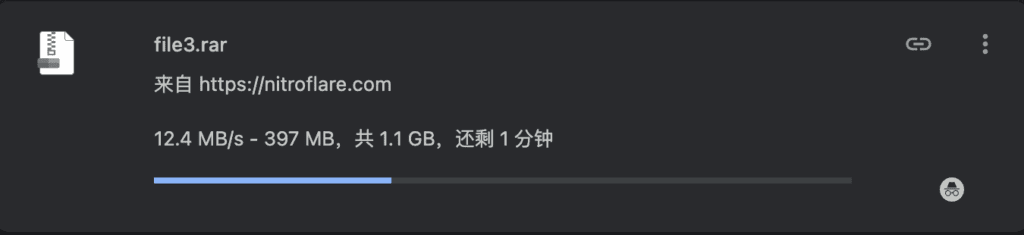
This is the simplest possible test — no download manager, no parallel tasks. It shows what one connection can do with Premium access alone. Fast enough to finish a 1 GB file in a few minutes, assuming the rate holds steady throughout.
Test 2: Chrome, Four Files at Once — 37.7 MB/s Combined
We then opened four Premium links simultaneously. Individual speeds varied: 7.3, 8.2, 11.9, and 10.3 MB/s.
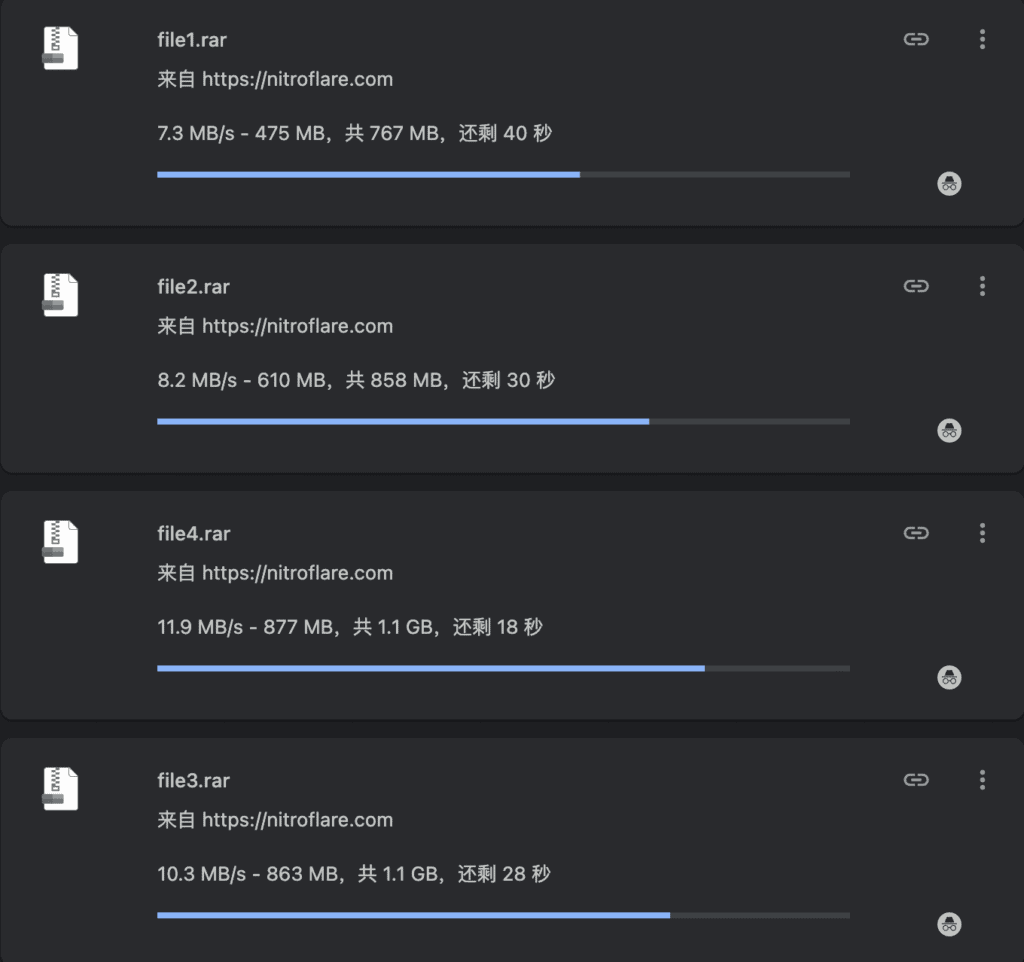
This confirms something important: one file alone wasn’t using our full bandwidth. Running several files in parallel is the only way to see what the connection can really do — and it’s particularly useful for multi-part RAR archives, where each piece can download as its own task.
Caveat: more isn’t always better. Beyond a certain point, additional simultaneous tasks can destabilize individual speeds or burn through your traffic allowance faster than expected. Four was the sweet spot in our test.
Test 3: JDownloader 2, Four Tasks — 45.2 MiB/s Combined
JDownloader produced our strongest result. The four visible tasks ran at 14.69, 6.33, 15.89, and 8.33 MiB/s — a combined ~45.2 MiB/s, using most of our available bandwidth.

JDownloader is simply more practical than a browser for anything beyond two or three files — it stores links, tracks progress, and keeps everything in one window instead of a dozen browser tabs.
Premium Account Recognition
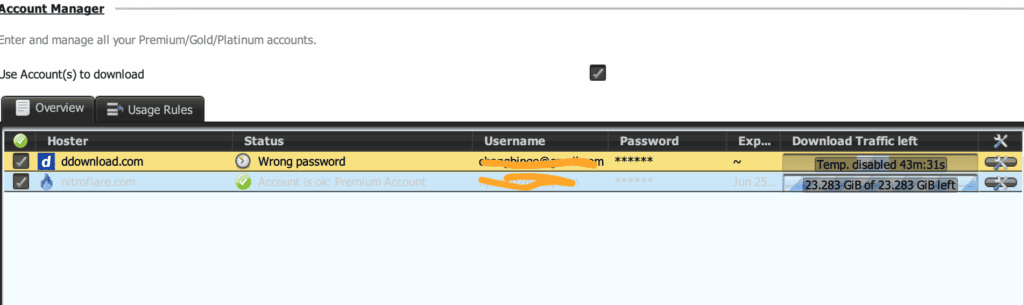
JDownloader correctly identified our login as a Premium Account and displayed the remaining traffic balance: 23.283 GiB at the time of the screenshot.
What the Free Experience Looks Like, for Comparison
Opening a link without Premium put us on a countdown page — our screenshot caught it at 1 minute 51 seconds remaining.
That delay is a minor annoyance for one file. For a twenty-part archive, it’s twenty repeated waits. The free tier is built for occasional use, not for unattended, multi-file queues.
Important Limitations
Premium is fast, not infinite. The traffic allowance still applies, and heavy multi-file sessions can burn through it quickly. Treat the login as personal — sharing it across multiple devices or locations can trigger account flags or temporary access issues.
Premium also won’t fix every slow download. A busy server, an unstable local connection, or a poorly routed VPN can still drag down speeds regardless of account type.
Who Should Buy Premium?
Premium makes sense if you already have several links queued, regularly download large or multi-part files, or want JDownloader managing your downloads hands-free.
Who Should Stay Free?
If you only need one small file occasionally, Free is the rational choice. Test the link first — upgrade only once waiting time, speed, or file volume becomes a genuine problem.
Need setup help either way? → Quick Start Guide
Want a side-by-side feature table instead of a full narrative? → Free vs Premium Comparison
Final Verdict
Across every test: 12.4 MB/s solo, 37.7 MB/s with four Chrome files, 45.2 MiB/s via JDownloader. That’s a real, measurable upgrade for serious downloading — but not essential for everyone. Light users should save their money and stick with Free.
Last updated: October 2026. Independent guide — not affiliated with Nitroflare.